Grand Theft Auto: Vice City
Play the classic PC game in a browser using your own installed files.
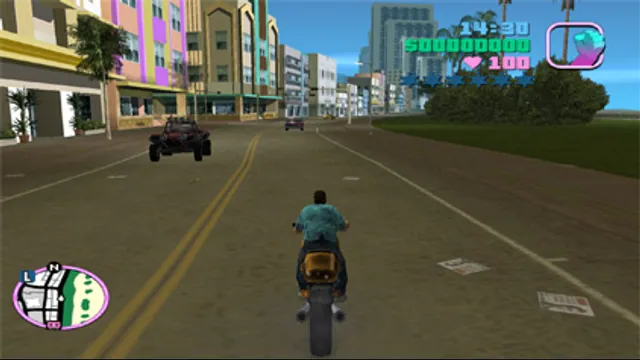
PlayYour game files requiredImage from the original game.
About this version
Erasmo Bellumat’s reVC Web brings the classic Vice City engine to WebAssembly with WebGL 2 rendering. Select your own PC installation on the hosted launcher; its large archives are read as needed, and saves stay in this browser.
- Project
- reVC Web · wasm.ltd
- Original game
- Grand Theft Auto: Vice City
Choose a version
Compare your options
Grand Theft Auto
Choose streamed Vice City or GTA III browser play, an own-files Vice City alternative, or native Liberty City Stories and GTA IV projects.
Read Grand Theft Auto guide- Vice City without supplying files
Rabisco’s modified reVC Web streams the classic game data; start with its desktop keyboard route.
- GTA III in a desktop browser
WASM Arcade documents re3-based play, keyboard/gamepad input and local save exports; launch includes advertising.
- Liberty City Stories
A native route for the supported PSP US v1.05 edition, with configurable keyboard, mouse and controller input.
- GTA IV on Apple mobile
An experimental signed iOS/iPadOS app using the exact Xbox 360 base and TU8, with a save-export workflow.
A city built around driving and missions
Vice City follows Tommy Vercetti’s rise through a fictional 1980s coastal city. Driving connects its missions: steal a car, find a contact, then alternate between chases, combat and jobs for rival characters. The open city also leaves room to explore between story assignments.
That combination is the appeal of the original game: a mission can give a drive across town a purpose, while an unfamiliar vehicle or a police pursuit can turn the journey into its own diversion. This listing concerns the classic PC game through reVC, with the original’s game data supplied by the player.
What reVC Web changes
reVC Web is Erasmo Bellumat and Origami’s browser adaptation of the community reVC engine. It compiles the engine with Emscripten and uses WebGL 2 to draw the game. The creator describes complete-game support and retains the game’s own menus, loading screens and options.
The useful distinction is how it gets the game: the hosted page reads your installed files from disk instead of asking you to retrieve a game archive from a mirror. Large archives stream from that local installation as the engine needs them. This is a separate browser adaptation from the Joncode client based on reVCDOS; the two launch sites use different setup instructions and separate browser save stores.
reVC Web project and requirementsBrowser launcher and local saves
Choose the classic PC installation
Have the original PC edition installed before opening the launcher. Select the folder containing models/gta3.img and data/gta_vc.dat, keeping the rest of the installation together. Those names identify the classic data format; buying the Definitive Edition does not provide this installation.
For an existing Steam copy, Manage → Browse local files opens the folder to locate. The creator also documents using a disc installation copied to disk. The official original GTA Trilogy bundle is a current purchase route for the classic PC games; install Vice City first and check the required folder contents before selecting it.
On the web page, press Play and then Select folder or file when the setup panel appears. The supported path reviewed here is an already installed folder. The page may ask you to grant access again on a later visit. No game files need to be uploaded to start this local-file workflow.
Creator installation helpBrowser launcher and local savesOriginal GTA Trilogy on Rockstar
Start with keyboard and mouse
Use a desktop browser that supports WebGL 2, SharedArrayBuffer and selecting a local folder. The page offers 16:9 or 4:3 display framing, a sound toggle and fullscreen. Changing the aspect selection reloads the page, so choose it before beginning a session.
The source defaults map movement to WASD or the arrow keys. F or Enter enters and exits vehicles; left mouse fires; Space jumps on foot and applies the handbrake in a vehicle; Shift sprints. The in-game options remain available for configuring controls. The creator also supports browser Gamepad API input, but no physical-controller or phone-play compatibility is promised here.
reVC Web project and requirementsBrowser launcher and local savesDefault keyboard and mouse controls
Keep your installation and browser saves
The port stores saves and settings in IndexedDB for the current browser profile. Keep the original installation available for subsequent sessions. Local browser saves are separate from your retail installation’s progress and from saves on other browser hosts.
Use the game’s own save system before leaving. Clearing the site’s storage or moving to another browser profile can remove or separate that progress. The launcher’s Reset action forgets the selected installation, so it is a setup control rather than a way to transfer saves.
Before you play
Do I need the original game files?
Bring your own installed classic PC Vice City folder containing models/gta3.img and data/gta_vc.dat. The Definitive Edition is a different version; this launcher reads the classic files locally.
Creator-reported · Project guideHow do I get started?
Open reVC Web, press Play, then select your installed Vice City folder when the file panel appears. The page can remember that folder; grant access again when returning.
- Open the HTTPS reVC Web launcher in a desktop browser and press Play.
- Choose your installed classic PC Vice City folder containing models/gta3.img and data/gta_vc.dat.
- Allow local access to that folder, then use the game’s own menu to start or load a game.
Which devices and browsers work?
Use a desktop browser with WebGL 2, SharedArrayBuffer and local-folder access. Keep hardware acceleration available and use the HTTPS launcher.
Creator-reported · Project guideWhat are the controls?
Default controls include WASD or arrow keys to move, F or Enter to enter a vehicle, left mouse button to fire, Space to jump on foot or apply the handbrake in a vehicle, and Shift to sprint. Gamepad input is also supported by the browser port.
Creator-reported · Project guideWhat is included in this version?
The creator describes a complete-game port of reVC, retaining the game’s own menus, loading screens and options.
Creator-reported · Project guideHow do saves work?
Saves and game settings are kept in this browser’s IndexedDB. This is local storage, so changing browser profiles does not carry progress with you.
Creator-reported · Project guideWhat should I know before playing?
The classic PC installation is required before the game can start. Keep using the same browser profile for its local saves; clearing site storage can remove progress.
Creator-reported · Project guideMade possible by Erasmo Bellumat / Origami · reVC contributors.
Project & original game credits
- Port author: Erasmo Bellumat / Origami
- Upstream author: reVC contributors
- Original developer: Rockstar North
Keep exploring
UnavailableA local-file web client whose asset-download route needs further review.
Original files requiredProject