Prince of Persia: PrinceJS in a browser or SDLPoP on desktop?
PrinceJS starts in a browser and preserves level settings in a link. SDLPoP is an installed DOS-based port with exact-state quicksaves and replays.
By Playable · Written
Choose how you want to practice
Choose PrinceJS for a direct browser start and documented phone controls. Choose SDLPoP for an installed DOS-based port with exact-state quicksaves and replays. These projects follow the first Prince of Persia, not The Shadow and the Flame or The Sands of Time.
The original game's attraction is deliberate movement: crossing a room means judging a run, jump or sword exchange. Jordan Mechner built its animation from filmed human motion. Both routes retain that emphasis on timing; the meaningful choice is how you want to practice and preserve progress.
Swipe or scroll to compare all columns →
Start PrinceJS
Open princejs.com, press to start, and use Enter to continue. The project's standard level range is 1–14. On a phone, use landscape; its touch guide shows how dragging between regions chains a running jump into a grab.
| Input | Action |
|---|---|
| Left / Right | Move; advance or retreat with sword drawn |
| Up | Jump, climb or block an attack |
| Down | Crouch, descend or sheathe sword |
| Shift | Grab a ledge, drink or strike |
| Space / Enter | Show time / continue |
For a pad, consult PrinceJS's controller map: its action buttons differ from SDLPoP's. Converted custom levels also have a specific limit: special events are unsupported.
Install and control SDLPoP
The download page linked by SDLPoP offers version 1.23 for Windows/Linux and 1.20 for macOS. Choose by platform, and keep the complete package together. The Mac disk image is an older release, so a feature mentioned in current development documentation may not be in that package.
On Windows, run prince.exe. Linux builds run ./prince; the README also gives platform build instructions. The source tree and compiled downloads are different starting points.
Arrows move, Up jumps or climbs, Shift acts and strikes, and Shift plus Left/Right takes careful steps. In combat, Up blocks and Down sheathes. Esc pauses. SDLPoP's gamepad defaults use Y for Up, A for Down and X or triggers for Shift.
Preserve a level or an exact moment
In PrinceJS, copy or bookmark the current address. It records level, maximum health, remaining minutes and guard strength; it is not an exact mid-jump snapshot. Restore by opening that address. A plain link to the homepage does not carry your progress parameters.
SDLPoP's Ctrl+G save works on levels 3–13 and resumes at the beginning of the saved level; use Ctrl+L during the intro to load it. F6 quicksaves the exact state and F9 restores it. Replays use .P1R files in replays/, and mod saves remain with their mod.
Check the quickload setting before using it to rehearse a difficult room. SDLPoP's configuration enables a penalty that can deduct up to one minute when quickloading. That makes a restored position different from a promise of cost-free retries. Keep a backup before experimenting with save or mod settings.
Keep practice settings consistent
Choose a consistent ruleset while learning. SDLPoP's configuration separates gameplay fixes from the base behavior, with use_fixes_and_enhancements controlling the group. Individual changes can affect jumping and enemy behavior. A trick learned under one setup may therefore need different timing under another.
If a pad behaves strangely in SDLPoP, its README points to a controller mapping file configured through SDLPoP.ini. Start with keyboard input to distinguish a mapping problem from the game's deliberate movement. For browser pairing and activation, see the controller guide.
For a short phone session, PrinceJS's documented touch regions make it the relevant option here. For practicing one troublesome jump, SDLPoP's exact-state save is the stronger reason to install it. Neither choice requires you to treat a URL bookmark, a native save and a replay as interchangeable files.
Project reading
See the creators’ setup instructions and feature guides.
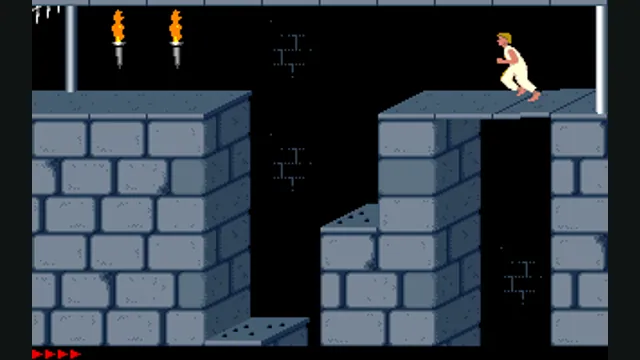
Prince of Persia DOS original-game reference, frame 60 of the linked gameplay animation; not an SDLPoP or PrinceJS capture.
Image credits ↗Prince of Persia DOS original-game reference, frame 60 of the linked gameplay animation; not an SDLPoP or PrinceJS capture.
Image credits ↗
How to use a controller with a browser game
Pairing a controller is only the first step. The browser must expose it, and the specific game must map its sticks and buttons. Start with a project that documents gamepad support.
Read guide : Connect a controllerProject image · credits
Back up browser game saves and check the restored game
Save inside the game, export a separate backup, then import and load it before removing the original. Confirm the restored character, map or level inside the game.
Read guide : Back up your browser savesProject image · credits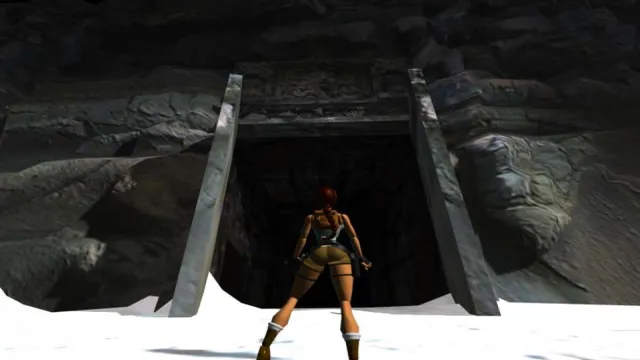
Tomb Raider: OpenLara’s browser demo or TRX for the full adventures?
Try a demo level in OpenLara, or prepare your owned Tomb Raider I–III files for an installed TRX adventure. The browser demo and trilogy engine have different scope.
Read guide : Choose OpenLara or TRXReference image · credits