Halo CE in your browser: which version should you choose?
Start with Hynes for desktop mouse play, HCEMobile for touch controls, or an OpenCE release for native desktop play. Bring your own original Xbox disc image.
By Playable · Written · Revised
Choose a version
Choose Mitchell Hynes Web for a desktop browser session with mouse aiming and a private match link. Choose HCEMobile for phone controls, an installable home-screen app and explicit save export. For an installed Windows or Linux game, use OpenCE’s native releases. Each asks for your own original Xbox game data.
The decision is about the client around Halo CE: importing a disc, handling input, finding friends and keeping progress. These projects do not turn Halo into Anniversary, Halo Reach or Halo 3. Nor does installing a website on a phone make it the same application as a native Android release.
Swipe or scroll to compare all columns →
| Version | Bring | Choose it for |
|---|---|---|
| Mitchell Hynes Web | An XISO from your own Xbox Halo CE disc | Desktop controls and private invite roomsChoose HCEMobile for documented phone controls. |
| HCEMobile | A verified original-Xbox .iso or .xiso | Touch play on iPhone, iPad or AndroidThe creator also documents controllers and desktop input. |
| OpenCE native | Your own Xbox ISO/XISO and the platform’s release build | An installed desktop game and local split-screen campaignA release build is the playing route; debug builds stop on assertions. |
For the fewest setup decisions on a desktop with an XISO ready, start with Hynes’s import screen. On a phone, HCEMobile’s editable touch layout is the stronger reason to choose it. Neither route supplies the original game.
Get the right files
Start with the original Xbox edition of Halo: Combat Evolved. A similarly named PC installation is not the Xbox disc image these launchers request. Renaming a file to .xiso does not convert it.
Hynes asks specifically for an XISO made from your own Xbox copy and supplies no game data. His launch screen links to the OpenCE community’s disc-ripping help, but his website is independently maintained: send host-specific problems to Hynes, not OpenCE. Check the import screen ↗
HCEMobile validates the imported disc and copies its maps into private browser storage, using up to 1.8 GB. The host says this local import does not upload your data. Allow space for that copy as well as the image you selected. See game-data requirements ↗
HCEMobile accepts full-game and multiplayer-disc versions. Pick the full-game image for the campaign: importing a multiplayer disc does not add campaign maps. Keep track of which copy is selected, because each imported version keeps separate progress.
Start on your device
Desktop: Mitchell Hynes Web
- Open the Hynes project page and follow Play to the host.
- Use Choose XISO, select your owned disc image, and wait for loading.
- Click the game or Focus game to capture the mouse. Move with WASD, aim with the mouse and fire with left click.
On this host, Space jumps, F melees, E/R handles the Xbox X action/reload button, and Tab or the wheel switches weapons. Right click or G throws a grenade; it is not a modern shooter’s aim-down-sights button. Z or middle click supplies zoom. Escape opens the pause menu.
Phone: HCEMobile
- Open HCEMobile and follow its installation instructions. On iPhone/iPad, use Safari’s Share → Add to Home Screen. On Android, use the browser’s install option.
- Import your verified disc image in the app you will use, let map copying finish, then choose Play.
- Use the documented touch layout or a supported controller. Export saved games before changing your setup.
HCEMobile’s left touch area moves and the right side aims. Choose Modern or Original Xbox layout, then use Edit layout to resize awkwardly placed buttons. Its getting-started guide also covers keyboard input and paired controllers.
Play with friends
Hynes documents map and mode selection followed by an invite link, with direct peer connections when possible. HCEMobile’s guide separates local modes from online play: campaign, split-screen and System Link need no account, while its online service requires a free account.
Use Hynes for an agreed map and mode with a private invite. Use HCEMobile’s Multiplayer → Matchmaking for its playlists, or Custom Games for its lobbies. These are different services; agree on the host before sharing an invitation.
HCEMobile’s troubleshooting guide asks both players to use the latest update and the same disc-image version. Try Wi-Fi if a mobile network blocks a direct connection. These instructions apply to HCEMobile’s service; a Hynes invite is a different route.
Saves and common problems
HCEMobile keeps saves with each imported game copy and offers export and restore. Select the right copy before looking for progress, and keep an export before moving devices. The browser-save guide explains how to check a restored copy without replacing your only working save.
On HCEMobile, memory errors call for closing other apps and tabs; black levels have a Lower-resolution textures option in Settings and data. For input trouble, its guide documents iOS 17 or later, Chrome on Android and a button press on the start page to activate a paired controller. See controller setup before starting a longer session.
On Hynes’s page, click the game or Focus game when the mouse is not captured. Keep host-specific troubleshooting with that host: changing a setting in HCEMobile does not change Hynes’s client.
When native OpenCE fits better
If you want to keep Halo outside browser storage, OpenCE provides native Windows, Linux and Android downloads. Select the release package, launch it and import your owned Xbox ISO/XISO; on desktop it extracts maps/ beside the executable. This is a separate installation from either web host.
OpenCE’s desktop guide documents two-player local campaign: one keyboard-and-mouse player can share with a gamepad player. Co-op starts a selected level and difficulty, rather than continuing one player’s single-player save. If a PC-style menu has empty lists, its documented fallback is the Xbox menu setting. OpenCE campaign, input and menu instructions ↗
The Halo decompilation source project serves a different purpose: reconstructing build 2342 with its exact development inputs. Choose a player-facing host or OpenCE release when your goal is a session, rather than a source build.
Project reading
See the creators’ setup instructions and feature guides.
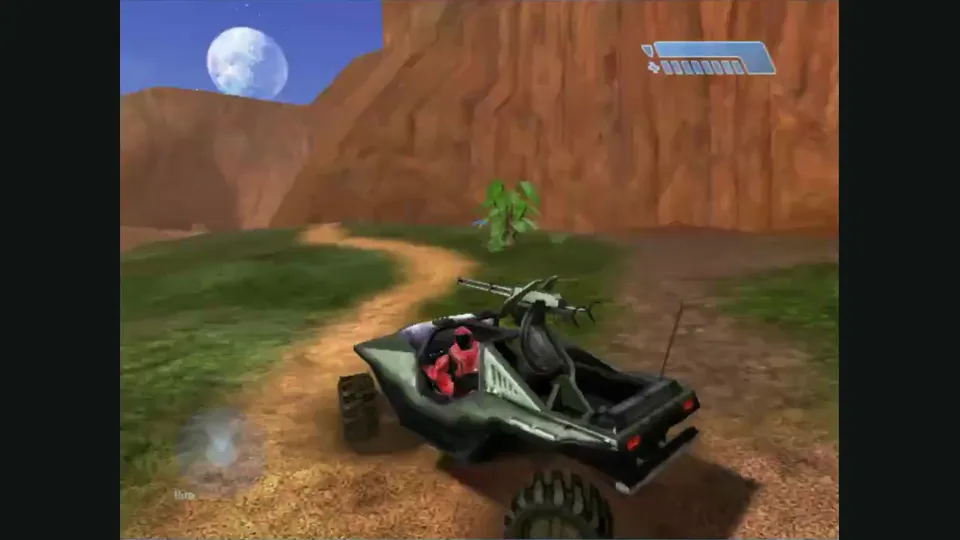
Mitchell Hynes Web gameplay, from the creator’s launch demonstration at approximately 1:52. Gameplay area cropped from the published video.
Image credits ↗Halo’s Xbox campaign and invite-based multiplayer, with your own disc image.
How to use a controller with a browser game
Pairing a controller is only the first step. The browser must expose it, and the specific game must map its sticks and buttons. Start with a project that documents gamepad support.
Read guide : Connect a controllerProject image · credits
Browser games on a phone: touch controls, files and saves
Choose a project with an actual touch layout before downloading large game files. A game that draws on a phone screen may still need a keyboard, mouse or controller.
Read guide : Prepare for phone playReference image · credits
Back up browser game saves and check the restored game
Save inside the game, export a separate backup, then import and load it before removing the original. Confirm the restored character, map or level inside the game.
Read guide : Back up your browser savesProject image · credits