Star Wars Battlefront II (2017)
Build a Death Star II browser sandbox from your own installed PC game.
About this version
luckeyfaraday’s research project reconstructs a limited Death Star II arena in a three.js browser runtime. It provides extraction and conversion tools, bots, rifles and Darth Vader’s kit. This is an unfinished source pipeline requiring Windows and your own installed PC game, rather than an instant hosted version or the original engine.
- Project
- SWBF2 Browser Reconstruction
- Original game
- Star Wars Battlefront II (2017)
A Death Star II reconstruction sandbox
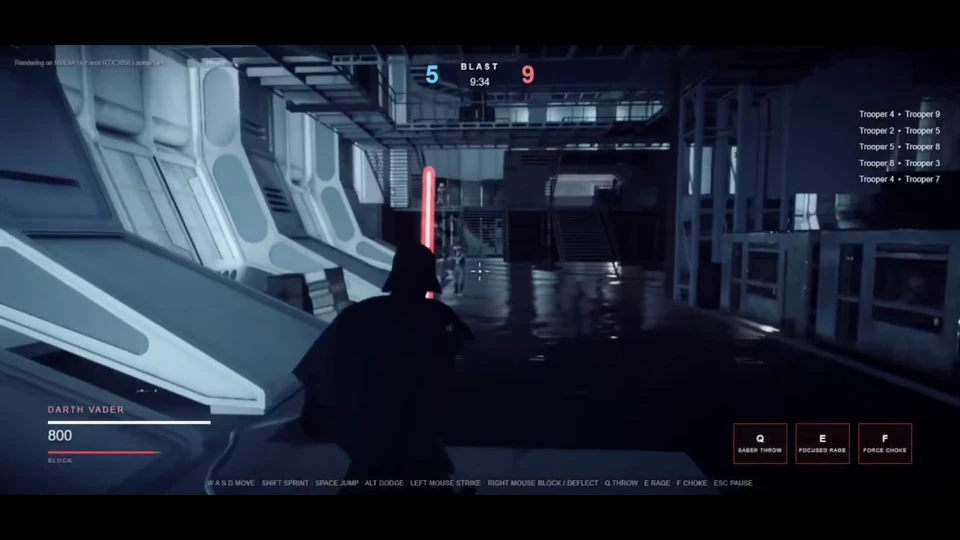
luckeyfaraday’s project rebuilds a limited part of Battlefront II (2017) for a three.js browser runtime. The reference target is Death Star II — Command Sector North. Blast and Free for All rounds use bots, original trooper models and E-11 or A280 rifles; Darth Vader adds saber combat and a recovered ability kit.
This is research-grade source software. It is neither a finished conversion of the full game nor the original Frostbite engine running in a web page. Missing systems include ragdoll physics, cloth simulation, parts of native animation blending and full sound mixing. Choose it as a reconstruction project with a bounded playable arena.
SWBF2 Browser Reconstruction · launch and setup documentation
Build the data on Windows first
The tools require a legitimately owned, installed final-patch PC copy of the 2017 game on Windows 10 or 11. Frosty Editor must be exactly version 1.0.5.2; the project also specifies .NET Framework 4.x, Python 3.11 and Node 20 or newer. No game content is included in the repository.
Set BF2_GAME_DIR to your installation, prepare Frosty, build the extraction adapter and run its selftest. Follow docs/PIPELINE.md in order to create the local exports and browser assets. There is no single build-everything command. After installing the web dependencies, tools/play.ps1 starts the local server and opens Chrome. Extracted content stays on your machine and must not be redistributed.
SWBF2 Browser Reconstruction · launch and setup documentation
Rifles and Vader use different action keys
WASD moves, Shift sprints, Space jumps, C crouches and Alt rolls or dodges. The mouse fires and aims, R vents weapon heat, V changes camera and Escape pauses. Those defaults make the trooper’s heat management part of the firing rhythm.
With Vader selected, left mouse strikes and right mouse blocks or deflects. Q throws the saber, E triggers Focused Rage and F uses Force choke. The launcher script accepts a Vader selection, but those source instructions still depend on completing the asset pipeline first.
SWBF2 Browser Reconstruction · launch and setup documentation
Before you play
Do I need the original game files?
You need a legitimately owned, installed final-patch PC copy of Battlefront II (2017). No game content is included; extracted data stays on your machine and must not be redistributed.
Creator-reported · Project guideHow do I get started?
On Windows 10/11, prepare Frosty Editor 1.0.5.2, .NET Framework 4.x, Python 3.11 and Node 20+. Set BF2_GAME_DIR, build the adapter and run its selftest, follow docs/PIPELINE.md stage by stage, install the web dependencies, then run tools/play.ps1. There is no single build-everything command.
Creator-reported · Project guideWhich devices and browsers work?
The extraction pipeline needs Windows 10/11. The documented runtime uses Google Chrome; other Chromium browsers can be selected for checks.
Creator-reported · Project guideWhat are the controls?
WASD moves, Shift sprints, Space jumps, C crouches and Alt dodges. Mouse buttons fire/aim, R vents heat, V changes camera and Esc pauses. As Vader, left mouse strikes, right mouse blocks, Q throws the saber, E activates Focused Rage and F uses Force choke.
Creator-reported · Project guideWhat is included in this version?
The reference arena is Death Star II — Command Sector North, with Blast and Free for All, bots, E-11/A280 rifles and Darth Vader. It is not a finished game or a complete campaign conversion.
Creator-reported · Project guideWhat should I know before playing?
Ragdoll physics, cloth simulation, native animation blending, full audio mixing and some shaders are not reproduced.
Creator-reported · Project guide